CSV
Quote-aware logical records and independently bounded tabular fields.
.csvNative Windows x64 · Read only
LeanRows opens the rows you need without turning the entire file into an in-memory workbook. It is a focused desktop viewer for CSV, TSV, JSONL, NDJSON, log, and text files.
Search literal values inline, jump to an absolute row, and copy bounded selections while the source remains read only.
v0.2.0 is an unsigned Windows x64 ZIP. Verify the accompanying
.sha256 file before running it.
Redesigned native interface
LeanRows v0.2.0 keeps the virtual owner-data grid below a responsive
top bar with file context, inline search, and direct actions. Files open
as tabs in one window, and a later launch hands its file to the window
that is already running. System follows the active Windows app theme,
while the appearance button cycles through System, Light, and Dark.
Indexing progress uses a flat two-DIP accent rule, and
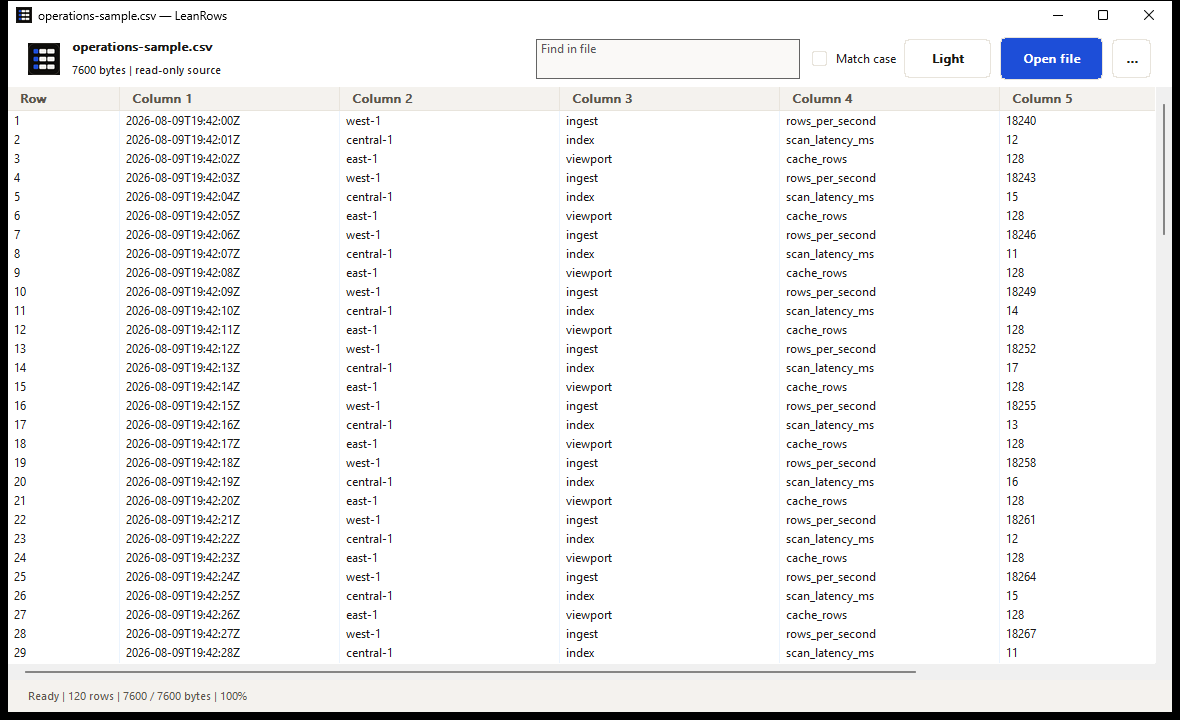
Windows high contrast uses system colors. The image below is an exact
1180×720 capture of the frozen v0.2.0 release
executable in Light appearance. It uses only synthetic data from
operations-sample.csv, with a second synthetic file open in
another tab: all 120 rows across six fields are indexed, and the status reads
Ready | 120 rows | 7600 / 7600 bytes | 100%. The binary and
fixtures were unchanged, the saved Dark preference was restored, and
the application closed cleanly.
Progressive by construction
The source file remains the backing store. LeanRows reads positioned blocks, records compact checkpoints, and reconstructs only the viewport requested by the native list view.
Purposefully narrow
LeanRows does not infer spreadsheet types or silently treat the first row as a header. It displays the structure that is present in the file.
Quote-aware logical records and independently bounded tabular fields.
.csvTab-delimited rows presented as native, resizable columns.
.tsvOne physical row at a time, without constructing a document-wide tree.
.jsonl · .ndjsonLine-oriented viewing with bounded previews and visible invalid bytes.
.log · .txtLimits are features
These are code-level capacities, not benchmark claims. Fields, previews, queues, and operation scratch space are also bounded so a large source does not authorize a proportional allocation.
A smaller attack surface
File content is untrusted and remains inert. LeanRows does not execute formulas, ANSI sequences, HTML, paths, or URLs found in a row.
Offline by design. No telemetry, account, cloud service, or network file path.
Local regular files only. UNC, remote, device, and reparse-point sources are rejected.
Snapshot integrity. Source identity and revision evidence are checked while work proceeds.
Visible damage. Invalid bytes are escaped and oversized display values are marked as truncated.
No write path. Editing, saving, transformation, macros, plug-ins, and scripts are outside v0.2.
Evidence before adjectives
Every tagged build must pass formatting, workspace tests, strict Clippy, native-control smoke tests, deterministic packaging checks, and the final checksum contract on the pinned Rust toolchain.
The frozen local v0.2.0 candidate passed 25/25 aggregate checks against its exact release binary, including document, random-seek, sparse logical-scale, source-preservation, network-observation, and whole-process-tree memory checks. The tagged release workflow separately verifies the release commit, rebuild, quality gates, package checksum, and published assets; the local receipt is not a substitute for that tagged proof.
Inspect the QA harnessesBefore installing v0.2.0
Windows may display a SmartScreen warning. Download the ZIP and its matching SHA-256 sidecar from the same GitHub Release, then compare the published value before running or installing LeanRows.
Get-FileHash .\LeanRows-v0.2.0-windows-x64-unsigned.zip -Algorithm SHA256Installation is per-user and requires no administrator access. Protected Windows choices are preserved; direct defaults are recorded and changed only where no protected choice exists.
Signing and privacy
Free code signing provided by SignPath.io, certificate by SignPath Foundation.
Signing is being set up. Releases made before it is active stay
unsigned and keep the -unsigned suffix in the ZIP name.
Only leanrows.exe is signed. It is built on GitHub Actions
from a tagged commit in the public repository, and every signing
request is approved by hand.
Team roles. LeanRows is a one-person project. Committers and reviewers: abooodbah. Approvers: abooodbah.
Privacy policy. This program will not transfer any information to other networked systems unless specifically requested by the user or the person installing or operating it. In practice LeanRows makes no network connections at all.
Uninstallation. LeanRows is portable: close it and
delete the extracted folder. It also keeps its appearance setting
under HKCU\Software\LeanRows and a search scratch folder
under %LOCALAPPDATA%\LeanRows, which you can delete too.
If you ran the optional installer, remove LeanRows from Installed apps
first.