
A read-only .pptx viewer
A free PowerPoint presentation viewer for Windows
Show the slides, not the office suite.
LeanSlides opens a .pptx as slides you can page
through, search, and present. It never runs macros or embedded
objects, and never fetches anything the file links to.
Signing status: the Windows build is not
code-signed, so SmartScreen may warn before it starts. Compare the
ZIP with its .sha256 file on the
release page,
or check its build provenance.
Release facts
- 0.9 MB
- About the size of the Windows ZIP. It bundles no browser.
- 95.6%
- Of PowerPoint's text lines written the same way, on 550 slides
- 455 ms
- To the first slide of a typical 23-slide deck, the median of 10 launches
- MIT
- Free to use, inspect, and improve
Who it is for
Open a .pptx without PowerPoint.
LeanSlides is for people who only need to read or show a
presentation. It opens .pptx, .ppsx,
.potx, .pptm, .ppsm, and
.potm files.
-
01
People without PowerPoint
Open the deck someone emailed you on a PC without Office. No account and no office suite.
-
02
People who present from a file
Page through the slides, read the speaker notes, and press F5 to present. Esc leaves the presentation.
-
03
People opening attachments they do not trust
Macros, OLE objects, and ActiveX controls never run, and nothing linked from outside the file is fetched.
The reading workflow
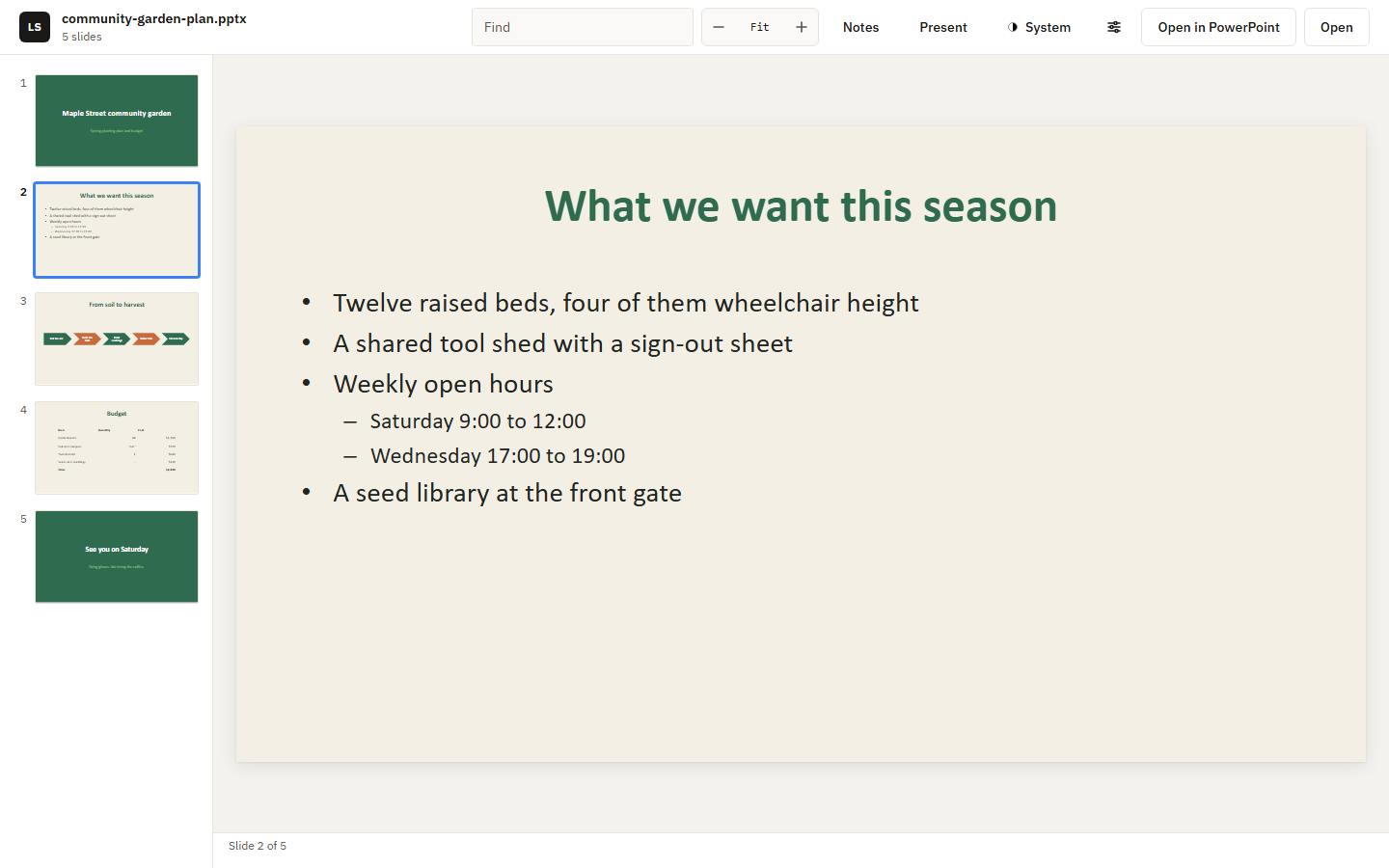
A presentation opens as slides.
Page through with the slide thumbnails or the keyboard. Fit the slide to the window, or zoom in.
- Slide thumbnails, fit to window, and zoom
- Presentation mode with F5; Esc leaves it
- Speaker notes
- Find across all slides, and copy the text of a slide
- Tabs, so several presentations stay open in one window
- Five themes, and a settings page that lists the keyboard shortcuts
- The interface in English, Simplified Chinese, and Japanese
Keyboard
The settings page lists every shortcut. The main ones:
- ← → Page Up Page Down
- Move between slides
- Home End
- First or last slide
- F5 Esc
- Start or leave the presentation
- Ctrl+F
- Find across slides
- Ctrl+Tab Ctrl+W
- Next tab, close tab
- Ctrl+1 to Ctrl+9
- Go to a tab
Fidelity
Measured against PowerPoint's own export.
On 2026-11-25, each slide LeanSlides drew was compared with the picture PowerPoint 16.0 exports for the same slide: 550 slides from 145 public decks.
Known gaps in this release:
- Charts, SmartArt, and ActiveX controls are shown as labelled boxes
- A few decks draw text about 20 px lower than PowerPoint
- Vertical text in table cells is drawn horizontally
- Some table-style header text colours differ
- Fonts that are not installed are replaced with others
The numbers
- 95.6%
- Of PowerPoint's 3,130 text lines, LeanSlides wrote 2,992 the same way on one line.
- 0.88
- Median SSIM, a picture similarity score, against 0.74 for an empty slide with the right background.
- 0.41
- Median gain: how far the drawing moves the score from the empty slide towards identical.
- 63 of 531
- Slides that score below their empty slide.
Start-up and memory
Measured on one laptop.
Measured on 2026-11-25 on an Intel Core i7-13620H laptop with
Windows 11 and WebView2 158. Each figure is the median of 10
launches. Memory is the private memory of
LeanSlides.exe and all its WebView2 processes once
they settle.
| What is open | Time | Memory |
|---|---|---|
| No presentation | Window in 114 ms, page ready in 424 ms | 89.4 MiB |
| A typical deck: 23 slides, 0.9 MB | First slide in 455 ms | 99.0 MiB |
| A large deck: 240 slides, 46 MB | First slide in 513 ms | 150.8 MiB; 294.4 MiB after paging through every slide |
Untrusted presentations
Macros and embedded objects never run.
LeanSlides reads a presentation and draws it. These are facts about LeanSlides's own code, not a guarantee about the Microsoft Edge WebView2 Runtime that draws the page.
LeanSlides's own code makes no network requests and has no telemetry, account, or ads. The WebView2 Runtime is a Microsoft component and may contact Microsoft on its own.
Read the source- No macros runMacros never run, in any of the file types LeanSlides opens.
- No embedded programsOLE objects and ActiveX controls never run.
- Nothing is fetchedPictures, video, backgrounds, and objects linked from outside the file are never fetched. A labelled placeholder shows instead.
- Stored pictures onlyCharts, SmartArt, video, audio, 3D models, ink, and similar content show the picture the file stores for them, or a labelled box.
- Read-onlyLeanSlides is a viewer. It opens presentations for reading and presenting.
Download
One package for Windows.
The ZIP is attached to the
v0.1.1 release
with a .sha256 file beside it.
| Platform | Package | Runtime and status |
|---|---|---|
| Windows 10 and 11, x64 |
LeanSlides-v0.1.1-windows-x64.zip,
about 0.9 MB, and its checksum
LeanSlides-v0.1.1-windows-x64.zip.sha256
|
Uses the Microsoft Edge WebView2 Runtime that Windows already has; it bundles no browser. Not code-signed. |
.sha256 file. The checksum proves the bytes match the
release asset; it does not prove who published them. The build
provenance check below ties the ZIP to this repository.
Install or run portable
Unzip the download. To install LeanSlides for your Windows user, run installer\install.ps1 from the unzipped folder. It needs no admin rights.
To use it portable, run LeanSlides.exe from the unzipped folder instead.
Checksum
Get-FileHash LeanSlides-v0.1.1-windows-x64.zip -Algorithm SHA256Run it in PowerShell and compare the hash with the one in the .sha256 file.
Build provenance
gh attestation verify LeanSlides-v0.1.1-windows-x64.zip --repo abooodbah/leanslidesThe GitHub CLI checks the ZIP against the build provenance attestation that this repository published for it.
Questions
Reading presentations without PowerPoint
How do I open a .pptx file without PowerPoint?
Download the ZIP from GitHub Releases, unzip it, and run LeanSlides.exe or the per-user installer. Then open the presentation in LeanSlides. No Office install and no account are needed.
Is LeanSlides free?
Yes. It is MIT licensed and free on GitHub.
Can I edit presentations?
No. LeanSlides is a read-only viewer. Use PowerPoint or another editor to change a presentation.
Can I present with it?
Yes. Press F5 to start the presentation and Esc to leave it. LeanSlides also shows the speaker notes.
Can I open an attachment without running its macros?
Yes. Macros, OLE objects, and ActiveX controls never run. Pictures, video, backgrounds, and objects linked from outside the file are never fetched; a labelled placeholder shows instead.
Which file types does it open?
.pptx, .ppsx, .potx, .pptm, .ppsm, and .potm. Charts, SmartArt, video, audio, 3D models, and ink show the picture the file stores for them, or a labelled box.
Why does Windows warn me when I start it?
The build is not code-signed, so SmartScreen may show a warning. Compare the ZIP with its .sha256 file, or check its build provenance with gh attestation verify, as shown in Download.
Does it work on Mac or Linux?
No. LeanSlides v0.1.1 is for Windows 10 and 11 on x64 only.
Which languages does the interface use?
The interface is in English, Simplified Chinese, and Japanese.
Does LeanSlides collect data?
No. It has no telemetry, no account, and no ads, and its own code makes no network requests. The WebView2 Runtime that draws the page is a Microsoft component and may contact Microsoft on its own.
The Lean family
Small viewers for local files.
LeanSlides is the fourth read-only viewer in the family. Each one opens one kind of file for reading.
Privacy
Privacy policy
This program will not transfer any information to other networked systems unless specifically requested by the user or the person installing or operating it.
LeanSlides's own code makes no network requests. It has no telemetry, no account, and no ads, and it never fetches pictures, video, backgrounds, or objects that a presentation links from outside the file. The slides are drawn by the Microsoft Edge WebView2 Runtime, a Microsoft component that is installed and updated separately and is not part of LeanSlides. That runtime may contact Microsoft on its own, under Microsoft's terms.
Uninstall
To remove an installed copy, use Settings > Apps > Installed
apps > LeanSlides; it also removes LeanSlides's settings and its
WebView2 folder. To remove a portable copy, delete its folder; its
settings in HKCU\Software\LeanSlides and the folder
%LOCALAPPDATA%\LeanSlides stay until you delete them.
Built in public
Real presentations make it better.
LeanSlides is early, public, and MIT licensed. Reports about slides that look different from PowerPoint are welcome. Never attach a private presentation: make a small file that shows the problem.